Give Every Search Result a Face
A hotel with only a name and a price is a listing without a photo.
Portal search cards now show a hotel’s first usable picture and its localised description. Alongside that, public hotel content such as stars, description, pictures and facilities is open to customers and API callers by default, while a seller can still close it for its own customers.
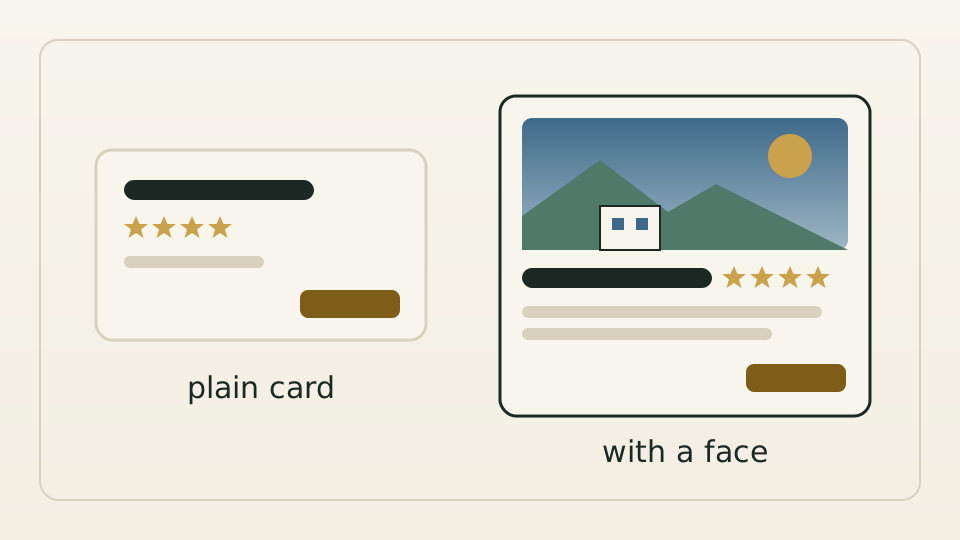
Put two search cards side by side. One shows a hotel’s name, stars and price. The other adds an exterior photo and two lines of description. When prices are close, it is obvious which one people open first. Yet the portal’s search cards only ever looked like the first, even though the search results already carried descriptions and pictures.
The cause was a default, not the interface. A hotel’s public content is its own group of fields, and customers and API callers only saw it after an explicit visibility setting had been configured for them. Without one, it was treated as hidden. So customers without their own setting received lists missing exactly the information people use to choose a hotel.
Public content is open to customers by default. A seller that wants to hide it from its customers can still set that group to hidden, and existing settings still take precedence. The default visibility of internal fields such as supplier and cost data is unchanged, and the API reference states the new default.
The portal card shows the first usable picture, loaded only when needed, with the hotel name as its alt text, and the description in the interface language, up to two lines. Hotels without a picture or description still get a clean card with name, stars and price: no placeholder image and no padded text.