See How Many Rooms Are Left Before You Book
Booking four rooms is easy until the fourth turns out not to exist at checkout.
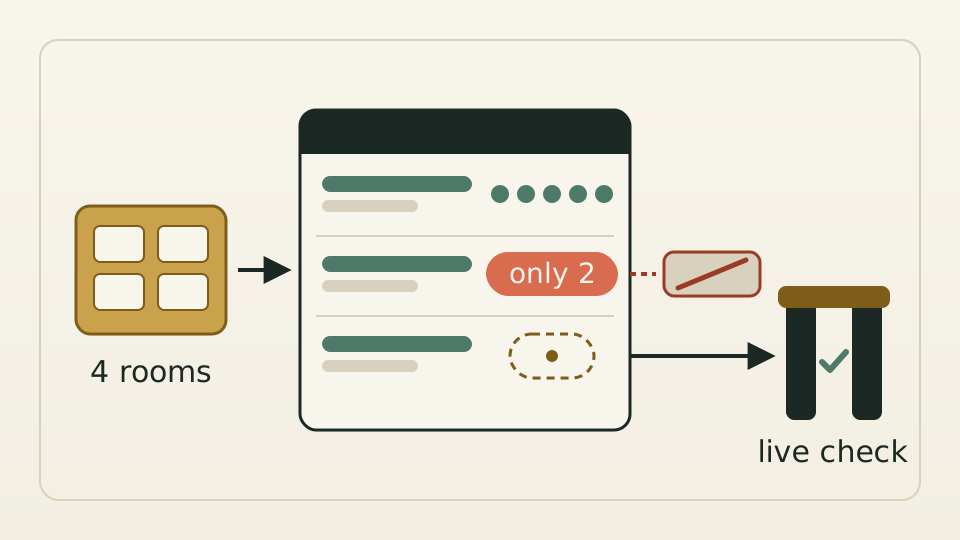
The portal’s room table adds how many rooms each rate has left, and the book button stops, with a reason, when you ask for more than are known to remain. An unknown count still lets you book; the live check before booking has the final word.
A travel agency needs four rooms at one hotel for a small group. The search shows the hotel is available, and the room table lists prices, meals and cancellation terms, but not how many rooms each rate has left. The agent tries rate after rate, and a shortfall only appears at the live check just before booking, after all the choosing is done.
The remaining count for each rate was already in the data the portal received; it just was not on screen. The question worth thinking through is what happens when the number is missing. Showing an unknown count as zero, or blocking a booking because of it, would turn away rooms that can be booked. Sold-out rates carry their own flag and do not depend on this number.
Each rate in the room table shows how many rooms are left, switches to a warning colour with “Only N left” at two or fewer, and says the count is unknown when it is. Ask for more rooms than are known to remain and the book button stops with “Only N left, not enough for M rooms”. An unknown count shows no zero and blocks nothing. The hotel list API also always carries the field, marking an unknown count explicitly instead of leaving it out, so integrators no longer have to guess whether data is missing or simply was not sent.
The change covers the room selection and booking screen in the portal. The hotel list does not filter by room count, and the public storefront is unchanged. The figure comes from what suppliers return, so it guides the choice rather than guaranteeing it, and the live check remains the last step before a booking is made.